
ZPL 轉 PNG 工具

貼上 ZPL,依目標印表機密度渲染標籤,並下載 PNG 圖片。

ZPLPNG先預覽再匯出
Label size813 × 1219 target dots (dpmm) · 8/12/24 dpmm ≈ 203/300/600 DPI

你的 ZPL 預覽會顯示在這裡。

Rendered by Labelary. PNG exports the selected label; PDF exports all labels. Verify printing and scanning on real equipment.

三步將 ZPL 轉為 PNG

貼上 ZPL

使用真實標籤模板,或載入範例查看圖片匯出效果。

渲染標籤圖片

依目標密度預覽標籤,讓下載的 PNG 更接近預期列印版式。

下載 PNG

儲存圖片用於文件、支援工單、問題重現或硬體測試前的視覺審核。

常見問題

不是。ZPL 轉 PNG 是把 ZPL 渲染成圖片;圖片轉 ZPL 則是把上傳圖片或 Logo 轉成 ZPL 圖形命令。
PNG 可以作為證明圖分享,但正式列印 Zebra 標籤通常應使用原始 ZPL。
會。請選擇與目標印表機一致的密度,讓坐標、條碼尺寸和圖形更接近實際輸出。
確認 ZPL 以 ^XA 開始並以 ^XZ 結束,然後使用 ZPL 驗證器或編輯器繼續排查。
Reproduce this workflow

Sample input

Use two complete ^XA…^XZ labels, with distinct LABEL A and LABEL B text.

Expected result

PNG exports the selected zero-based index. PDF exports all labels in their source order at the selected page size.

Failure and correction

Index 1 is the second label. A single-label input with index 1 fails; choose 0. Old images are invalidated when source/settings change.

Support and data handling

Preview/PDF uses Labelary. PDF is a proof, not a replacement for the original production ZPL; verify output with your printer workflow.

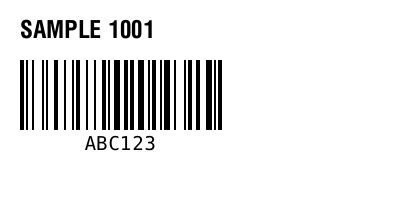
^XA
^FO20,20^A0N,24,24^FDSAMPLE 1001^FS
^FO20,60^BY2
^BCN,70,Y,N,N^FDABC123^FS
^XZ
PNG exports the selected zero-based index. PDF exports all labels in their source order at the selected page size.

Maintained by ZPLPreview · Updated 2026-11-01 · Engine verification; no physical printer certification. About · Contact

ZPL 轉 PNG 工具 - 匯出 Zebra 標籤圖片