

Best for one-line ERP/WMS ZPL
Editing dense production ZPL from ERP, WMS, shipping, or marketplace integrations while keeping commands readable before preview.
Použijte tento online editor ZPL, pokud chcete jasnější strukturu než obyčejnou textovou oblast. Zvýraznění syntaxe vám pomůže skenovat příkazy před spuštěním náhledu ZPL. Po úspěšném náhledu ZPL si stáhněte PNG nebo PDF stejným způsobem jako v našem prohlížeči ZPL. Fráze ZPL náhled zde znamená vykreslení štítku, abyste si mohli ověřit rozvržení před tiskem.
Náhled ZPL se zobrazí zde.
Rendered by Labelary. PNG exports the selected label; PDF exports all labels. Verify printing and scanning on real equipment.
Editing dense production ZPL from ERP, WMS, shipping, or marketplace integrations while keeping commands readable before preview.
Paste production ZPL, format or compare it, preview the label at the target density, then export PNG or PDF proof for review.
Use the approval report for release notes, or check barcode width and scan readiness before production printing.
Many production systems emit compact ZPL on one line. The editor makes that payload readable before a preview, support ticket, or approval review.
^XA^PW812^LL1218^FO48,48^A0N,42,42^FD{{ORDER_NO}}^FS^FO48,118^A0N,30,30^FD{{SHIP_TO}}^FS^FO48,220^BY3^BCN,130,Y,N,N^FD{{TRACKING}}^FS^XZ^XA
^PW812
^LL1218
^FO48,48^A0N,42,42^FD{{ORDER_NO}}^FS
^FO48,118^A0N,30,30^FD{{SHIP_TO}}^FS
^FO48,220^BY3
^BCN,130,Y,N,N
^FD{{TRACKING}}^FS
^XZVložte nebo napište ZPL; příkazy vynikají, takže chyby jsou snadněji rozpoznatelné.
Použijte stejný náhled ZPL podporovaný štítky jako na domovské stránce, abyste viděli pixely, nikoli odhady.
Po náhledu ZPL uložte PNG pro vstupenky nebo PDF pro sdílení – volitelné stažení ZPL pro tiskárnu.
Load the shipping, barcode, QR or minimal template and edit its fields.
The input remains editable; dimensions and density control the preview canvas. Export the original ZPL for printing.
A field outside the selected canvas is clipped. Check ^FO coordinates and physical label size before changing printer calibration.
Formatting and rule checks are separate tools in All Tools. The preview uses Labelary and its command support limits.
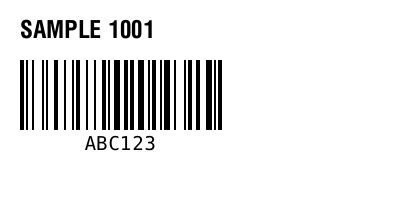
^XA
^FO20,20^A0N,24,24^FDSAMPLE 1001^FS
^FO20,60^BY2
^BCN,70,Y,N,N^FDABC123^FS
^XZ
Maintained by ZPLPreview · Updated 2026-11-01 · Engine verification; no physical printer certification. About · Contact