

Best for one-line ERP/WMS ZPL
Editing dense production ZPL from ERP, WMS, shipping, or marketplace integrations while keeping commands readable before preview.
Gebruik deze online ZPL-editor wanneer u meer structuur wilt dan een gewoon tekstvak. Syntax highlighting helpt commando's te scannen vóór ZPL-voorbeeld. Na een geslaagd ZPL-voorbeeld downloadt u PNG of PDF zoals in onze ZPL Viewer. ZPL-voorbeeld betekent hier het renderen van uw label om de lay-out vóór printen te controleren.
Uw ZPL-preview verschijnt hier.
Rendered by Labelary. PNG exports the selected label; PDF exports all labels. Verify printing and scanning on real equipment.
Editing dense production ZPL from ERP, WMS, shipping, or marketplace integrations while keeping commands readable before preview.
Paste production ZPL, format or compare it, preview the label at the target density, then export PNG or PDF proof for review.
Use the approval report for release notes, or check barcode width and scan readiness before production printing.
Many production systems emit compact ZPL on one line. The editor makes that payload readable before a preview, support ticket, or approval review.
^XA^PW812^LL1218^FO48,48^A0N,42,42^FD{{ORDER_NO}}^FS^FO48,118^A0N,30,30^FD{{SHIP_TO}}^FS^FO48,220^BY3^BCN,130,Y,N,N^FD{{TRACKING}}^FS^XZ^XA
^PW812
^LL1218
^FO48,48^A0N,42,42^FD{{ORDER_NO}}^FS
^FO48,118^A0N,30,30^FD{{SHIP_TO}}^FS
^FO48,220^BY3
^BCN,130,Y,N,N
^FD{{TRACKING}}^FS
^XZPlak of schrijf ZPL; commando's vallen op zodat fouten sneller te zien zijn.
Gebruik hetzelfde Labelary-ondersteunde ZPL-voorbeeld als op de startpagina om pixels te zien, geen giswerk.
Na ZPL-voorbeeld: sla PNG op voor tickets of PDF om te delen—optioneel ZPL voor de printer.
Load the shipping, barcode, QR or minimal template and edit its fields.
The input remains editable; dimensions and density control the preview canvas. Export the original ZPL for printing.
A field outside the selected canvas is clipped. Check ^FO coordinates and physical label size before changing printer calibration.
Formatting and rule checks are separate tools in All Tools. The preview uses Labelary and its command support limits.
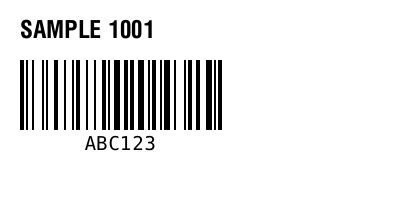
^XA
^FO20,20^A0N,24,24^FDSAMPLE 1001^FS
^FO20,60^BY2
^BCN,70,Y,N,N^FDABC123^FS
^XZ
Maintained by ZPLPreview · Updated 2026-11-01 · Engine verification; no physical printer certification. About · Contact