

Best for one-line ERP/WMS ZPL
Editing dense production ZPL from ERP, WMS, shipping, or marketplace integrations while keeping commands readable before preview.
ใช้ตัวแก้ไขนี้เมื่อต้องการโครงสร้างชัดกว่ากล่องข้อความธรรมดา ไฮไลต์ช่วยตรวจคำสั่งก่อน ZPL preview หลังแสดงตัวอย่าง ZPL สำเร็จ ดาวน์โหลด PNG หรือ PDF ได้เหมือนใน ZPL Viewer «ZPL preview» ที่นี่หมายถึงการเรนเดอร์ฉลากเพื่อตรวจเลย์เอาต์ก่อนพิมพ์
ตัวอย่าง ZPL จะแสดงที่นี่
Rendered by Labelary. PNG exports the selected label; PDF exports all labels. Verify printing and scanning on real equipment.
Editing dense production ZPL from ERP, WMS, shipping, or marketplace integrations while keeping commands readable before preview.
Paste production ZPL, format or compare it, preview the label at the target density, then export PNG or PDF proof for review.
Use the approval report for release notes, or check barcode width and scan readiness before production printing.
Many production systems emit compact ZPL on one line. The editor makes that payload readable before a preview, support ticket, or approval review.
^XA^PW812^LL1218^FO48,48^A0N,42,42^FD{{ORDER_NO}}^FS^FO48,118^A0N,30,30^FD{{SHIP_TO}}^FS^FO48,220^BY3^BCN,130,Y,N,N^FD{{TRACKING}}^FS^XZ^XA
^PW812
^LL1218
^FO48,48^A0N,42,42^FD{{ORDER_NO}}^FS
^FO48,118^A0N,30,30^FD{{SHIP_TO}}^FS
^FO48,220^BY3
^BCN,130,Y,N,N
^FD{{TRACKING}}^FS
^XZวางหรือพิมพ์ ZPL; คำสั่งชัดเจน จับข้อผิดพลาดง่าย
ZPL preview เดียวกับ Labelary บนหน้าหลัก—เห็นพิกเซล ไม่ใช่เดา
หลัง ZPL preview บันทึก PNG หรือ PDF—ดาวน์โหลด ZPL สำหรับเครื่องพิมพ์ได้
Load the shipping, barcode, QR or minimal template and edit its fields.
The input remains editable; dimensions and density control the preview canvas. Export the original ZPL for printing.
A field outside the selected canvas is clipped. Check ^FO coordinates and physical label size before changing printer calibration.
Formatting and rule checks are separate tools in All Tools. The preview uses Labelary and its command support limits.
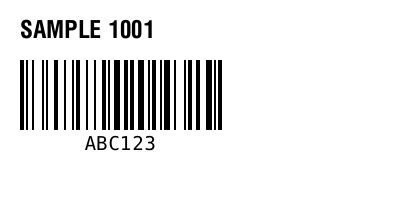
^XA
^FO20,20^A0N,24,24^FDSAMPLE 1001^FS
^FO20,60^BY2
^BCN,70,Y,N,N^FDABC123^FS
^XZ
Maintained by ZPLPreview · Updated 2026-11-01 · Engine verification; no physical printer certification. About · Contact