

适合场景
把 Zebra 标签证明发给 QA、运营、供应商或支持工单,无需让每个审核人打开打印工具。
粘贴 Zebra ZPL,选择打印密度,先预览标签,再下载清晰的 PDF 证明文件。适合物流标签、ERP 模板和上线前审批。
你的 ZPL 预览会显示在这里。
Rendered by Labelary. PNG exports the selected label; PDF exports all labels. Verify printing and scanning on real equipment.
使用 ERP、WMS、物流接口或标签模板实际发送给 Zebra 打印机的同一段 ZPL。
按 203、300 或 600 DPI 渲染标签,让 PDF proof 更接近目标打印机类别。
把 PDF 分享给 QA、运营或客户,同时保留可编辑 ZPL 源码给工程排查。
先预览准确的 ZPL,再导出 PDF,让非技术审核人员确认版式、文本、条码位置和缺失字段。
当承运商标签、箱标或退货标签需要视觉确认时,将 proof 分享给运营或仓库团队。
将 PDF proof 附到 ERP、WMS、承运商或打印机支持工单,同时保留可编辑 ZPL 源码给工程人员。
需要正式审核文档时用 PDF;需要把预览嵌入聊天、缺陷报告或视觉对比时用 PNG。
PDF 适合作为审核材料。生产打印仍应保留原始 ZPL,这样条码命令、打印机设置和变量字段都保持原生。
把 PDF proof 附到工单或审批记录时,带上足够上下文,方便其他人复现标签。
PDF proof 检查清单:
- 源 ZPL payload 或模板版本
- 打印机型号和密度
- 标签尺寸和耗材类型
- 预期条码扫码结果
- 审核人和审批日期
- 是否完成实物打印样张:是/否把 Zebra 标签证明发给 QA、运营、供应商或支持工单,无需让每个审核人打开打印工具。
按目标打印密度渲染准确的 ZPL,下载 PDF proof,并把源 ZPL 一起保存在审批记录中。
如果 PDF 暴露裁切、缺字或条码位置问题,继续使用字段检查器或审批报告。
Use two complete ^XA…^XZ labels, with distinct LABEL A and LABEL B text.
PNG exports the selected zero-based index. PDF exports all labels in their source order at the selected page size.
Index 1 is the second label. A single-label input with index 1 fails; choose 0. Old images are invalidated when source/settings change.
Preview/PDF uses Labelary. PDF is a proof, not a replacement for the original production ZPL; verify output with your printer workflow.
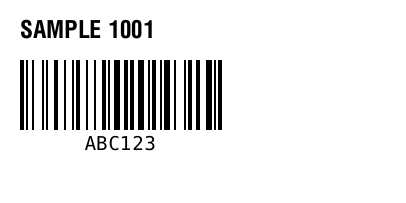
^XA
^FO20,20^A0N,24,24^FDSAMPLE 1001^FS
^FO20,60^BY2
^BCN,70,Y,N,N^FDABC123^FS
^XZ
Maintained by ZPLPreview · Updated 2026-11-01 · Engine verification; no physical printer certification. About · Contact